NEW FINANCE SYSTEM FOR CLUBS AND SOCIETIES
Our new Student Expenses platform for Clubs and Societies is now live - please see here.
- Attached is quick start guide which provides an overview of how it looks and works.
- This webpage incudes some helpful resources and frequently asked questions.
- You can also find a playlist of short trainings / video walkthroughs for this here.
Registering
-
To set your individual user accounts up, you’ll simply need to register using your LSE email address. If this doesn’t work, it’s probably because you used a personal email address when standing for election on the LSESU website, in which case you should use this one or your LSE Student ID instead, so that it can match you up that way. Other committee members who’ll be claiming reimbursements will need to set their own accounts up in this way as well.
-
Once this is done, you’ll then be able to use the platform on the App or the Web Login interchangeably – whichever you prefer.
Reimbursing
- Please refer to the guides/videos above, and the drop-down menu below for details on actually using this platform.
Invoices
- If you have an invoice that you want to submit through the Student Expenses platform, you may not be able to initially (unless the supplier is already set up on our system).
- To set up a new supplier, you'll need to email the following details to su.sport@lse.ac.uk (for Clubs) or su.societies@lse.ac.uk (for Societies): Supplier Name, Full Address, Bank Account Details, Email Address.
- From there, the SU's Finance team will be able to set them up as a supplier on your behalf.
Group Balances
- The new platform also allows Presidents and Treasurers to view the current balance of their Club/Society. The system will only recognise your role if you've been given Admin Rights, though, so if you're not able to access these balances, that's the reason why. Reminder that to get Admin Rights, you'll need to have completed the Moodle modules - once you've done that just email su.societies@lse.ac.uk (if you're a Society) or su.sport@lse.ac.uk (if you're a Club).
Issues
- If you encounter any issues in the rollout of this new platform, please report them to su.societies@lse.ac.uk.
Reimbursements
The primary way for Clubs and Societies to get reimbursed is via the Student Expenses platform, so please just default to that in the first instance. If there's an issue with certain claims being processed that way, or if there's another reason why an alternative method would be more suitable, you may be asked to complete a Payment Request Form instead - see both methods below:
'STUDENT EXPENSES' PLATFORM
Once you've registered your account on the platform (see details at the top of this page for guidance on doing so), submitting/approving claims is a relatively straightforward process. The start guide and video walkthroughs (also linked at the top of this page) explain all of the steps in detail, but for a condensed summary, please see below:
- When logged in, click on the 'Expenses' icon.
- Click on the 'New' button.
- From here you can enter all of the specific details related to the reimbursement claim, and then click 'Save'.
- You'll then be promoted to enter the 'Expense Type', along with the claim amount and description.
- Once you've entered everything you're claiming for, you'll need to attach the relevant evidence/receipts for those claims.
- The final thing to do is preview the submission if you'd like, and/or jump straight to submitting it for approval.
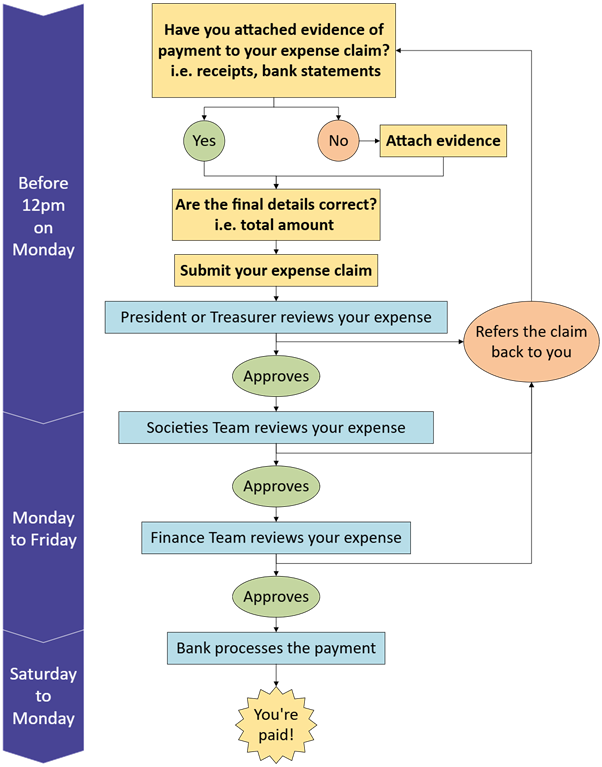
From there, your President/Treasurer will be notified of the claim by email and/or pop-up notification (depending on their individual settings), and they'll be able to approve/reject it on the platform as necessary, provided they've also fully registered. Once approved by the President/Treasurer, it will then come to the Clubs or Societies team, and we'll be able to approve or reject it as necessary from our end as well. Finally, the SU's Finance team will then review it, too, and load it on to the weekly payment run. Please see the images below for an illustration of this process/timeline.
Payment Request Form
For certain payments, it can sometimes be the case that they need to be processed slightly differently (i.e. if the bank details / currency aren't being accepted, or if there's an issue with the Student Expenses platform).
For these, you'll just be asked to complete this form instead, and follow the same basic principles that apply to the Student Expenses method:
- Ensure you enter all of the required details correctly.
- Get it signed by your President/Treasurer.
- Email it to the relevant team (su.societies@lse.ac.uk or su.sport@lse.ac.uk) alongside the payment evidence/receipts.
The chart below provides a visualised workflow for how the payment approval process and timeline works:
Payment Timeframes
Our SU Finance Team make weekly payment runs.
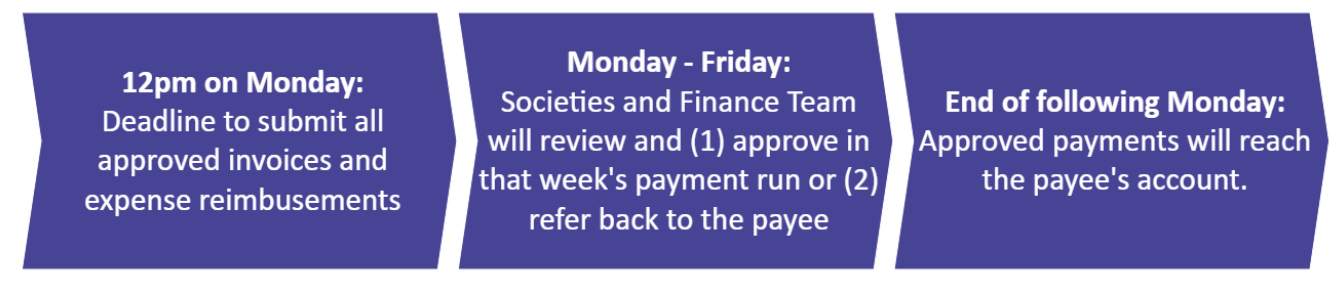
Anything received after 12pm on a Monday, will be processed in the following week's payment run.
Evidence
For all reimbursements, we require both of the following for each payment:
- Photos of the receipts and/or order confirmation
- A screenshot of the payment(s) on the payees online banking or bank statement. (All other transactions can be blanked out for privacy, as long as we can see the payments being reimbursed)
Top tip: Always ensure you obtain a receipt for any purchases you make. If one isn't provided automatically, please ask the shop/ restaurant for one!
Invoices
You can also pay someone directly from your LSESU account by submitting an invoice. Request an invoice from the company you want us to pay, and upload this to the 'Student Expenses' system. For invoices over £1,000, please email it to either su.societies@lse.ac.uk or su.sport@lse.ac.uk. We can pay invoices in a foreign currency, but please be aware that international transactions usually incur a fee, which will be charged to your club or society.
All invoices must:
- Be correctly addressed to LSE Students' Union, Saw Swee Hock Student Centre, 1 Sheffield Street, London, WC2A 2AP
- Include the suppliers details (name, address, e-mail)
- Have an invoice date
- Have an invoice number
- Include a VAT number (if applicable)
- Include details and dates of services
- Have a correct total on invoice
- Include the suppliers bank account details
If your invoice exceeds £10,000 please allow at least two weeks for this as this needs to be escalated to senior management.
If you have an invoice which has already been paid, please submit it alongside a payment request form and proof of payment, and the payee of the invoice will be reimbursed.
Important things to remember
Club or Society money cannot be used to reimburse items or social that are only for your committee or select members.
-
Club or Society money cannot be used to reimburse items or social that are only for your committee or select members.
- Any spending on events should only happen once an event form has been approved. Unfortunately, we're unable to reimburse expenses for events that haven't yet been approved.
- We are unable to approve reimbursements of alcoholic spirits.
-
Please don't spend more than £50 of your own money if planning to reclaim!
-
Societies are not permitted to have external bank accounts.
Processing payments
To ensure your payment requests are processed, you’ll need to have the funds available in your group account, and have everything signed off by your Treasurer (or by your President if you are submitting a request as Treasurer of your group).
The SU aren't able to authorise claims which would take your group's balance below £0, so please ensure you have the money in your account to cover any costs. If you’re using ticketing income to cover the cost of an event, please ensure these are set up far enough in advance so that the income can be used for making payments.
Paying coaches or officials
All coaches and officials should be paid by invoice where possible. If is is not possible to invoice officials, you can either:
- Submit a payment request form alongside an Officials Payment Receipt to su.sport, or
- Submit an Officials Payment Receipt through the 'Pay & Reimburse' system.